 Live
Live
 Secure & Safe
 Download in PDF
 Official PITC Data
Frequently Asked Questions
You can check your FESCO electricity bill online by entering your 14-digit reference number or customer ID on fescobil.pk. After submitting the number, your latest bill details will appear instantly, including due date, amount, and billing status.
To check bills online, simply visit the official bill checking platform like fescobil.pk, enter your reference number, and click the check bill button. The system will fetch your latest electricity bill details within seconds.
You can check your bill payment history by using your customer ID or reference number through your electricity provider’s official system. Some details may also be available through your bank app or payment service if you paid online.
You can check your power bill online by entering your bill reference number on a trusted bill checking website like fescobil.pk. This allows you to view your current bill amount, due date, and download a duplicate copy in PDF format.
Download Your FESCO Online Bill 2026
Checking your Faisalabad Electric Supply Company bill should not feel like solving a mystery novel. Yet many users still struggle to find their bill, print a duplicate copy, or understand why taxes suddenly look like they joined the gym and gained extra weight.
This complete guide explains everything about FESCO Bill Online, including how to do a FESCO online bill check, how to download a FESCO duplicate bill, payment methods, peak hours, taxes, SMS alerts, customer support, and much more.
Whether you need a FESCO bill online check by reference number, want to know your FESCO bill paid or not, or need help with a bill correction, this Guide covers it clearly.
FESCO (Faisalabad Electric Supply Company) is one of the major electricity distribution companies working under the power sector structure of WAPDA and regulated by NEPRA. It serves millions of consumers across Pakistan, especially in central Punjab.
If your monthly electricity bill arrives late, or your postman decides to start a new career, you can still check your electricity FESCO bill online check in seconds.
How to Find a 14 Digit Reference Number?
Your FESCO online bill check 14-digit process starts with one important thing: the reference number. This is a unique 14-digit number printed on your electricity bill. You can usually find it near the top-left or top-right section of the bill.
It looks something like this:
14 Digit Reference Number: 12345678901234
You will also see:
- Consumer ID
- Customer ID
- Meter Number
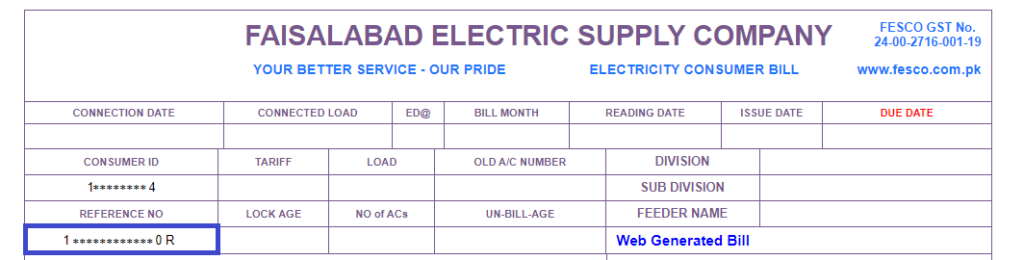
But for the FESCO bill online check by reference number, the 14-digit reference number is the most important. You can find it on the previous monthly bill, the printed duplicate bill, the old saved PDF bill, the bill copy from the landlord, or the meter-related customer documents.
Without this number, checking your FESCO bill online becomes difficult. Sadly, electricity bills do not respond to “bro, show yourself.”
How to Check and Download FESCO Bill Online
The easiest method for online FESCO bill check is through the official bill lookup system.
Steps for FESCO Check Bill:
- Open the FESCO bill checking portal
- Enter your 14-digit reference number
- Click submit
- Your latest bill will appear
- Download your FESCO duplicate bill
This process helps with:
- FESCO bill check online 2026
- FESCO monthly bill check
- FESCO bill due date check
- FESCO old bill history
- FESCO bill estimate
- FESCO bill customer name check
Many people search for www FESCO bill check com pk, but always use trusted official portals to avoid incorrect or outdated data.
Can You Do FESCO Bill Check by CNIC?
Most users search for FESCO bill check by CNIC online, but officially FESCO mainly supports checking through the Reference Number or Consumer ID. CNIC-based checking is generally not a standard method.
So yes, searching “FESCO bill check by CNIC” is common, but the reference number remains the most reliable and accurate option.
How to Print FESCO Bill Online
After checking your bill, printing it is simple. Follow the steps for the FESCO Bill Print:
- Open your bill page
- Click Print
- Select printer settings
- Save as PDF if needed
- Print physical copy
This is useful for:
- Bank payments
- Office reimbursement
- Rental property records
- Tax filing
- Government documentation
Many users search for FESCO online bill check print and FESCO bill print online free, and yes, it is completely free—no secret VIP membership required.
How to Print FESCO Tax Certificate
FESCO consumers may need a tax certificate for different official and financial purposes.
It is commonly used for:
- Income tax filing
- Business accounting
- Commercial usage records
You can request a FESCO tax certificate through the following channels:
- FESCO customer service center
- Relevant sub-division office
- Billing office assistance
In some cases, online support may guide you, but physical verification is often required for confirmation.
Always keep these documents ready:
- CNIC
- Consumer ID
- Previous electricity bills
- Ownership proof (if required)
TOU/TOD Meter
TOU means Time of Use, and TOD refers to Time of Day billing. These systems apply different electricity rates depending on the time of usage.
Electricity is usually divided into:
- Peak hours
- Off-peak hours
This system helps control heavy electricity usage and supports load management across the power grid. For example:
Using an AC at midnight may cost less than running it during peak evening hours when electricity demand suddenly increases across neighborhoods.
TOU and TOD meters are commonly used for:
- Commercial users
- Industrial consumers
- High-load domestic consumers
How to Check FESCO Bill Paid or Not?
Want to confirm whether your bill is paid? Here’s how:
Check Unpaid FESCO Bill
You can verify your payment status through the following methods:
- Bank receipt
- Mobile banking app
- JazzCash
- EasyPaisa
- Customer service center
- Updated online bill portal
If your latest bill still shows dues after payment, wait a few hours because payment updates may take time to reflect in the system.
Sometimes the system is fast. Sometimes it moves like Monday morning.
How to Fix the FESCO Bill Not Found Error?
Sometimes users face the issue: “Bill not found.”
This usually happens due to the following reasons:
- Wrong reference number entered
- Recently issued bill not updated yet in the system
- Temporary server issue
- Old or disconnected electricity connection
- Incorrect Consumer ID
FESCO Bill Not Received – What to Do
If your bill is not showing or received, try the following steps:
- Recheck the 14-digit reference number carefully
- Wait 12–24 hours for system update
- Contact FESCO helpline for assistance
- Visit your nearest subdivision office
- Verify active meter connection status
These steps solve most common FESCO bill correction and “bill not found” issues.
FESCO Peak Hours and Load Management
Knowing FESCO peak hours charges helps reduce your electricity bill. Peak hours may vary seasonally and depend on the applicable tariff structure, while rates are regulated under NEPRA tariff schedules. Consumers should always verify the latest timing through official notices and their billing details.
Common High Usage Appliances:
- Air conditioners
- Electric heaters
- Irons
- Washing machines
- Water motors
How to Reduce FESCO Electricity Bill Charges
Use heavy appliances during off-peak hours. This helps you with Lower monthly bills, Better load management, and Reduced peak load pressure. Your bill and your future self will both thank you.
How to Apply for SMS Service
FESCO offers SMS alerts for the following services:
- Bill generation notifications
- Due date reminders
- Service notices
- Complaint tracking updates
You can register for SMS alerts by visiting the nearest customer service center or using the official online portal:
http://old.fesco.com.pk/E-Mail-Bill.asp
Required details for registration:
- Reference number
- Mobile number
- Consumer details
This service helps ensure you never miss important billing updates and prevents the classic excuse: “I forgot the due date.” Your bill, however, never forgets.
FESCO Bill Email Service
Consumers can also register for e-bill delivery through email. This service provides a convenient and eco-friendly way to receive electricity bills digitally.
Benefits of e-bill service include:
- Faster bill delivery
- No paper dependency
- Easy digital record keeping
- Instant access to duplicate bills anytime
It is especially useful for users who prefer digital communication over traditional postal delivery systems.
This method ensures your bill reaches you directly in your inbox without relying on the local post office.
About FESCO
Faisalabad Electric Supply Company (FESCO) supplies electricity to millions of users across Punjab. It operates as a major power distribution company responsible for transmission and billing services.
Its core responsibilities include:
- Electricity supply
- Meter management
- Consumer billing
- Complaint resolution
- Connection services
- Load management
FESCO serves both protected and non-protected consumer categories depending on usage slabs and tariff structure.
FESCO Services
As a FESCO electricity consumer, you may need to resolve issues or contact representatives from time to time. Therefore, it is important to understand the major FESCO services available for users.
Major FESCO services include:
- New connection applications
- Load extension requests
- Bill correction services
- Duplicate bill issuance
- Online complaint registration
- Meter replacement services
- SMS alert registration
- Email billing service
- Consumer verification
- Disconnection and reconnection support
Bill Information
Always review your electricity bill before payment. Electricity bills tend to include more surprises than birthdays do.
A standard FESCO electricity bill includes:
- Reference number
- Consumer ID
- Meter reading
- Billing cycle
- Due date
- Previous balance
- Current charges
- Fuel Price Adjustment (FPA)
- Quarterly Tariff Adjustment (QTA)
- Taxes and duties
- Total payable amount
FESCO Consumers
FESCO provides electricity services to different types of users based on their needs and usage patterns.
Consumer categories include:
- Domestic consumers
- Commercial consumers
- Industrial consumers
- Agricultural users
- Government institutions
- Bulk supply customers
Each category follows different tariff structures depending on load requirements and electricity consumption levels.
FESCO Coverage Area
FESCO mainly covers central Punjab around Faisalabad and surrounding districts. It provides electricity services across a wide operational network.
Coverage includes:
- Faisalabad
- Jhang
- Toba Tek Singh
- Chiniot
- Sargodha
- Mianwali
- Khushab
- Bhakkar
Districts and Their Cities
| District | Cities / Areas |
|---|---|
| Faisalabad District | Faisalabad City, Jaranwala, Chak Jhumra, Tandlianwala, Samundri |
| Sargodha District | Sargodha City, Sillanwali, Sahiwal, Bhera, Shahpur, Bhalwal, Kot Momin |
| Jhang District | Jhang City, Ahmad Pur Sial, 18-Hazari, Shorkot |
| Toba Tek Singh District | Toba Tek Singh City, Pir Mahal, Kamalia, Gojra |
| Bhakkar District | Bhakkar City, Darya Khan, Mankera, Kallur Kot |
| Khushab District | Khushab City, Noorpur Thal, Naushera, Quaidabad |
| Mianwali District | Mianwali City, Isa Khel, Piplan |
| Chiniot District | Chiniot City, Lalian, Bhowana |
Key Features of FESCO Online Bill
Easy Access to FESCO e Bill
Users can check their electricity bills anytime without visiting offices or waiting in long queues.
Mobile Friendly Interface
The FESCO online bill check system is fully optimized and works smoothly on all mobile devices.
Historical Bill Data
Users can easily review previous billing records for comparison and better usage tracking.
Download FESCO Duplicate Bills
Duplicate bills are available instantly and can be downloaded in PDF format whenever needed.
Multiple Bill Payment Options
Banks, mobile apps, digital wallets, and physical payment counters all support FESCO bill payments.
Bill Alerts and Notifications
SMS and email alerts help users stay updated and avoid missing due dates.
Comprehensive Bill Details
Users can clearly view units consumed, taxes, duties, fuel adjustments, and total payable amount.
Aim of FESCO
The main aim of FESCO is simple: reliable electricity supply with transparent billing and improved customer service.
It also focuses on:
- Reducing line losses
- Improving customer satisfaction
- Supporting industrial growth
- Managing electricity demand efficiently
Payment Methods
Online Payment
You can pay your WAPDA FESCO bill through multiple convenient methods, making the payment process fast and hassle-free.
Available payment options include:
- Mobile banking
- Internet banking
- ATM machines
- JazzCash
- EasyPaisa
- Banking apps
How to Pay Using Apps
MCB Live
Open the app, select bill payment, choose utility bills, select electricity, enter your reference number, and confirm the payment.
EasyPaisa
The process is similar to MCB Live but faster and widely used for FESCO bill payments due to its simplicity and accessibility.
JazzCash
JazzCash also supports instant electricity bill payments with immediate receipt confirmation for user convenience.
Offline Payment
You can also pay your FESCO bill through traditional offline methods.
- Banks
- Post offices
- Authorized payment centers
These methods are traditional, reliable, and still preferred by users who trust paper receipts more than digital screenshots.
Customer Service Centers
You can visit customer service centers or use the online complaint portal for assistance with various services, including:
- Bill correction
- Duplicate bill issuance
- Complaint resolution
- New connection assistance
- Load extension requests
Make sure to bring your bill copy and valid ID to save time and speed up processing.
FESCO MIS
FESCO MIS refers to the Management Information System used for billing, complaint tracking, and operational monitoring.
It helps improve:
- Billing accuracy
- Complaint handling
- Service transparency
- Consumer record management
FESCO Bill Correction
If your bill has:
- Wrong meter reading
- Extra units
- Incorrect name
- Wrong tariff
- Duplicate charges
Visit the subdivision office immediately and bring:
- CNIC
- Previous bills
- Meter photo
- Ownership proof if needed
Quick action prevents bigger billing problems.
Common Issues and Solutions
Common problems include:
- Bill not found
- Wrong units
- Payment not updated
- SMS not received
- Duplicate billing
- Delayed bill delivery
Most issues are resolved through customer service centers or helpline support.
Taxes and Charges of FESCO Bill Explained
FPA
Fuel Price Adjustment reflects changes in fuel costs in power generation.
Fixed Charges
These apply regardless of usage. Yes—even when you used almost nothing. Electricity has commitment issues.
Energy Charges
These depend on your unit consumption and tariff slab.
Taxes
Taxes may include government-approved billing components depending on the applicable category and tariff.
Electricity Duty
A provincial charge added to electricity consumption.
Head Office Address
FESCO Head Office
West Canal Road, Abdullahpur, Faisalabad, Punjab, Pakistan
FESCO Customer Support and Helpline
For complaints and support, contact official FESCO channels:
- Customer service centers
- Subdivision offices
- Complaint registration desks
- Official helpline services
Always keep:
- Reference number
- Consumer ID
- Meter details
ready before calling. It saves time and reduces the classic support conversation: “Sir, consumer number batayein…”
“Uh… I knew this moment would come.”